
Jackery Explorer 300 Review: Weekend Camping Power
The Jackery Explorer 300 is a compact 288 Wh / 300 W station for phones, laptops, fans, and CPAP nights — not a fridge or A/C solution. Here's who it fits, what owners report, and when to skip it.
Updated
The buying question: is 288 Wh enough for your weekend?
The Jackery Explorer 300 is a 288 Wh, 300 W portable power station that weighs 8.2 lb and lists at $289. It's built for the gap between a phone power bank and a heavy home-backup unit: charging laptops and phones, running a fan or lamp through an outage, and keeping a CPAP going overnight at a campsite.
It is not a fridge or A/C solution. Owners who tried to stretch it to kitchen appliances during multi-day outages came away clear that this is a small-device station. If your outage plan includes keeping food cold or running a space heater, this is the wrong class of product — look at a larger station or a home backup system instead.
This review is based on the listing specs and owner themes from Amazon reviews on file. Those are home-user checks, not lab-bench measurements. I have not run calibrated capacity tests; where owners report real-world numbers, I note them as owner reports.
Budget tradeoff: at $289 and $1.00/Wh, this station sits in the small-device class. A step-up capacity class (roughly 500–1,000 Wh) typically costs more per unit but buys the headroom to run a fridge or a longer outage — only worth it if your load list actually includes those appliances.
- Enough for: phones, tablets, laptops, fans, lamps, a TV, a heating pad, CPAP (humidifier off, DC outlet).
- Not for: refrigerators, A/C, space heaters, or sustained large-appliance loads.
- List price $289; nameplate $/Wh is $1.00/Wh.
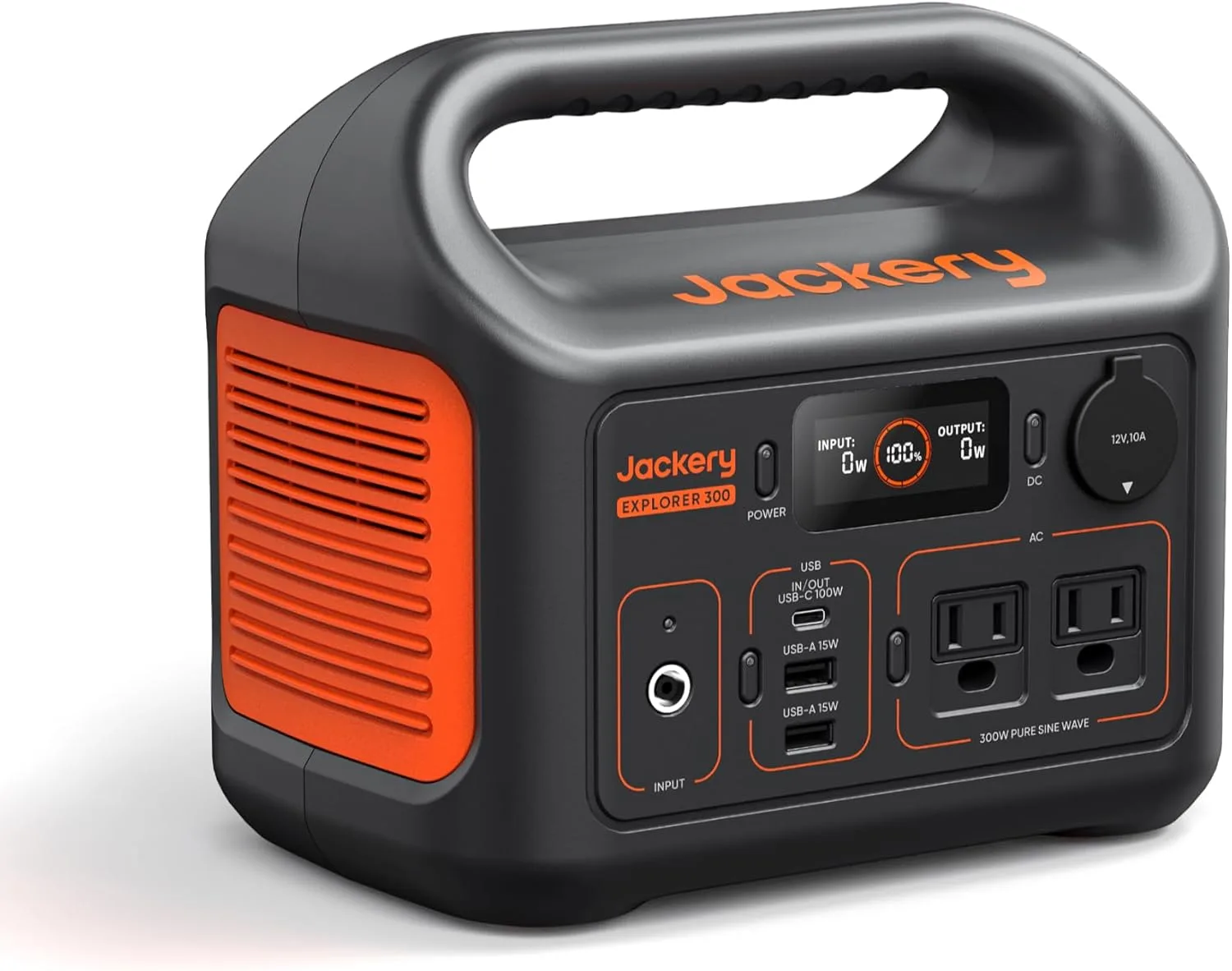
Jackery Explorer 300 Portable Power Station,292Wh
Highlights
- 288Wh rated capacity
- 300W continuous AC
- 600W surge
- LiFePO4 chemistry
- 8.2 lb (~3.7 kg)
- About $289 list
Best for
- Explorer 300 v2: phones, cameras and a laptop on short trips
- Travel kits when you need quiet pack power, not appliance runtime
- Brief desk backup for router and lights — not a fridge for days
Strengths
- Explorer 300 v2: 288Wh pack with 300W continuous / 600W surge — size loads to both numbers
- 8.2 lb (~3.7 kg) is the lightest-class carry in this band — easier stairs and car packing
- 10ms-class UPS switchover on the listing — useful when a router restart would hurt
- Owners on file: Theme: Customers find the power station reliable, with one mentioning it provides more than enough power duri…
Watch-outs · not ideal when
- Explorer 300 v2's small Wh class empties fast with a kettle, hair dryer or space heater
- 300W continuous will not hold heating elements or many compressor surges for long
- Solar input unpublished for Explorer 300 v2 — do not assume a same-day off-grid refill
- Airline and pack limits may still block Explorer 300 v2 even when the weight looks friendly
Owner voices
Short takes from public retail reviews — paraphrased or translated when long or non-English; meaning kept close to the original.
“Theme: Customers find the power station reliable, with one mentioning it provides more than enough power during outages, and they appreciate its quick charging capability, with one noting it can run a diesel heater fo…”
“Theme: Phone Charging (149)”
“Theme: Electronics (107)”
Specs that actually matter on the trail
The headline numbers are 288 Wh capacity and 300 W continuous AC output, with a 600 W peak surge per the listing. That continuous rating is the one to respect: a 300 W station will run a laptop charger, a fan, and a few small devices at once, but it will not carry a 500 W appliance no matter what the surge figure says.
Ports per the catalogue are AC×2, USB-C×1, USB-A×1, and car×1. Note: the listing text on file shows 'USB-A×15,' which is almost certainly a listing error for a 288 Wh station — treat the USB-A count as one and confirm on the product page before buying. The USB-C port is rated 100W PD on the listing, which is enough to fast-charge a laptop or tablet. The car port is useful for topping up from a vehicle, though owners note it's slower than wall charging.
Weight is 8.2 lb, and the integrated handle makes it a one-hand carry for most adults. One owner's parents in their 80s could lift and move it, and another described it as easy to carry like an oversized lunchbox. That portability is the main reason to pick this over a larger station with more capacity.
How I weighed the tradeoffs: portability and charging speed first, because a station you can't lift or won't wait to charge goes unused; capacity second, sized against a realistic small-device load list rather than the nameplate number.
- Capacity: 288 Wh (the listing details also show 292 Wh; 288 Wh is the catalogue figure used throughout this review).
- Output: 300 W continuous, 600 W peak surge (listing).
- Weight: 8.2 lb.
- Ports: AC×2, USB-C×1, USB-A×1 (listing shows '×15' — likely a listing error), car×1.
- Chemistry: LiFePO4, listing claims 4,000 cycles to 70% capacity.
What owners report in real use
The strongest theme across high-helpful reviews is portability. Owners repeatedly mention that it's light enough to move around the house or campsite without help, and that the handle makes it easy to carry from car to tent. That matters more than it sounds: a station you can actually lift is one you'll use.
Charging speed from a wall outlet is another consistent positive. Owners report a few hours to full, and several note it arrived with a partial charge, so it was usable immediately during an unexpected outage. Solar pairing works well with a 100W panel for one owner, who saw around 70W consistently — but another owner couldn't get a third-party 100W foldable panel to work at all, so panel compatibility is worth checking before you rely on it.
CPAP use comes up often. Owners who turn off the humidifier and use the DC outlet report multiple nights per charge; one owner got four full nights (about 35 hours) with a pressure setting of 7.0. With the AC plug and humidifier on, one owner used about 60% of the battery in a single night. The DC route is the efficient one.
The main caveat is capacity versus the label. One owner's full-cycle test with a desktop, monitor, modem, and LED lamp (about 55 W total) delivered roughly 230 Wh against the rated capacity. That's a real-world shortfall worth planning for: treat usable capacity as load-dependent, not absolute. (The owner cited 298 Wh; the catalogue figure used here is 288 Wh — the listing itself shows a 288/292 Wh discrepancy, so expect some variance in the label.)
- Portability: light enough for older users to lift; easy one-hand carry.
- Wall charging: a few hours to full; arrives with partial charge.
- Quiet: fan is short and soft; one owner calls it zero noise.
- CPAP: 4 nights / ~35 hours with humidifier off and DC outlet (owner report, pressure 7.0).
- Capacity caveat: one owner measured ~230 Wh vs rated capacity on a ~55 W mixed load.
- Solar: 100W panel delivered ~70W for one owner; another third-party panel didn't work.
Where it falls short — and who should skip it
The Explorer 300 is not an outage solution for your kitchen. Owners who tried to run a small refrigerator during a multi-day outage found it couldn't sustain the load. If your plan includes keeping food cold, running a space heater, or powering a sump pump, this station is undersized — you need a unit with higher continuous output and more capacity.
Wall charging still takes a few hours, so outage prep requires planning. Car charging is noticeably slower, and one owner found a third-party solar panel didn't work at all. If you need instant, indefinite backup, a larger station with a transfer switch or a smart panel is the better route.
The capacity shortfall some owners report is another reason to size with margin. If you need a guaranteed 288 Wh of usable output, plan for less and buy a larger unit — or treat this as a phone/laptop/lamp station, which is what it does well.
Other anxieties worth naming: cold-weather capacity loss (LiFePO4 derates in freezing temps, so plan for less usable Wh on winter trips), warranty length (check the current listing — not on file here), and fan noise at night (owners describe it as short and soft, but it does run under load).
When the cheaper phone-power-bank route is enough: if your load list is just a phone and a tablet for a night or two, a 20,000 mAh power bank costs far less and covers it — this station earns its price only when laptops, a fan, or a CPAP are on the list.
- Skip if you need to run a fridge, A/C, space heater, or sump pump.
- Skip if you need instant, indefinite whole-home backup.
- Skip if you rely on third-party solar panels without checking compatibility.
- Skip if you need guaranteed full rated capacity under heavy loads.
- Skip if a phone power bank already covers your load list.
The decision: buy it for small-device weekends, not for the fridge
Buy the Jackery Explorer 300 if your needs are phones, laptops, fans, lamps, a TV, a heating pad, and CPAP nights at a campsite or during a short outage. At 8.2 lb and $289, it's a light, quiet, fast-charging station that owners consistently describe as easy to live with. The LiFePO4 chemistry and 4,000-cycle claim (listing) suggest a long service life, though I can't verify that beyond the listing.
Skip it if you need to keep food cold, run kitchen appliances, or power a whole home through an extended outage. For those jobs, look at a larger station or a home backup system with a transfer switch. This is a small-device station, and owners who tried to stretch it further came away clear on that limit.
Runtime math to self-match your load: a typical laptop charges in roughly 1–1.5 hours at ~50–60 W, so the 288 Wh nameplate covers about 4–5 laptop charges in theory — plan for fewer given the owner-reported shortfall. A 10 W fan runs roughly 20+ hours on paper; a 30 W CPAP setup with humidifier off lands near the owner's ~35-hour report. Your numbers will vary with load and temperature.
One Amazon Associates note: purchases through links on this page may earn a commission. Picks are fit-led, not commission-led.
- Buy if: weekend camping, phone/laptop/lamp backup, CPAP with humidifier off.
- Skip if: fridge, A/C, space heater, whole-home backup, or guaranteed full capacity.
- List price $289; nameplate $/Wh $1.00/Wh.
Specs at a glance
The table below uses the catalogue figures for the Jackery Explorer 300. Where a spec isn't published, it's marked n/a (not on file). The USB-A count is shown as 1; the listing text shows '×15,' which is almost certainly a listing error.
| Product | Capacity (Wh) | Continuous Output (W) | Weight (lb) | Ports | List Price | $/Wh |
|---|---|---|---|---|---|---|
| Jackery Explorer 300 | 288 | 300 | 8.2 | AC×2; USB-C×1; USB-A×1 (listing shows ×15 — likely error); car×1 | $289 | $1.00 |
Methodology and evidence
This review is based on the product listing specs and owner themes from Amazon reviews on file. Those are home-user checks, not lab-bench measurements. I have not run calibrated capacity tests; where owners report real-world numbers, I note them as owner reports. The listing aggregate is 4.6 from 11,336 ratings — that's a listing figure, not owner proof.
Avery Nolan is the WattPicks founding editor, covering portable power station capacity, output, and price-per-Wh guidance across the catalogue — no lab claims.
- Amazon Associates disclosure: purchases through links on this page may earn a commission. Picks are fit-led, not commission-led.
Frequently asked
Can the Explorer 300 pass through power while charging?
The listing does not state pass-through charging on file. If you need to run a load while the station is plugged in, confirm with the manufacturer before relying on it.
Can I use the AC outlets and USB-C port at the same time?
Yes, within the 300 W continuous output limit. The USB-C port is rated 100W PD on the listing, so a laptop on USB-C plus a small AC load is realistic; a high-wattage AC appliance plus fast USB-C charging will push the total toward the limit.
How should I store it, and does it self-discharge?
LiFePO4 stations hold charge well, but the listing doesn't publish a self-discharge rate. A common practice is to top it up every few months and store it cool and dry — check the manual for the manufacturer's specific guidance.
How much capacity do I lose in cold weather?
LiFePO4 derates in freezing temperatures, so plan for less usable Wh on winter trips. The listing doesn't publish a derating curve; treat cold-weather capacity as lower than the 288 Wh nameplate.
What's the warranty?
Warranty length is not on file for this listing. Check the current product page before buying — it's a real decision factor at this price.
Can it run a CPAP all night?
Yes, with the humidifier off and the DC outlet — one owner got four nights (about 35 hours) at pressure 7.0. With the AC plug and humidifier on, expect about 60% of the battery per night.
Will it run a fridge?
No. Owners who tried a small refrigerator during a multi-day outage found it couldn't sustain the load. This is a small-device station.
Does it work with any solar panel?
Not necessarily. One owner's 100W panel delivered about 70W, but another third-party foldable panel didn't work at all — check compatibility before relying on solar.
Method and sources
Model names and list prices come from the WattPicks catalog at build time. WattPicks does not run its own laboratory tests on power stations, and nothing on this page is presented as a measured result — it is catalog-backed buying guidance.
Read our methodology for how the catalog is normalized, and about WattPicks for who publishes it.